Facts checked on 16 October 2026
Short answer
An Apple Nearby Interaction accessory uses Bluetooth LE to set up the session and UWB to range. On the DWM3001C both share one nRF52833 core with Nordic’s SoftDevice and Qorvo’s pre-compiled FiRa library. The most-documented trigger for silent stalls is Bluetooth LE advertising during UWB sessions; forum reports also cite several iPhones at once, wrong firmware targets and app message errors. Stop or slow advertising while ranging, add a MAC-level watchdog and size stall tests statistically. If one core is not enough, move Bluetooth LE to a separate core.
How an accessory session works
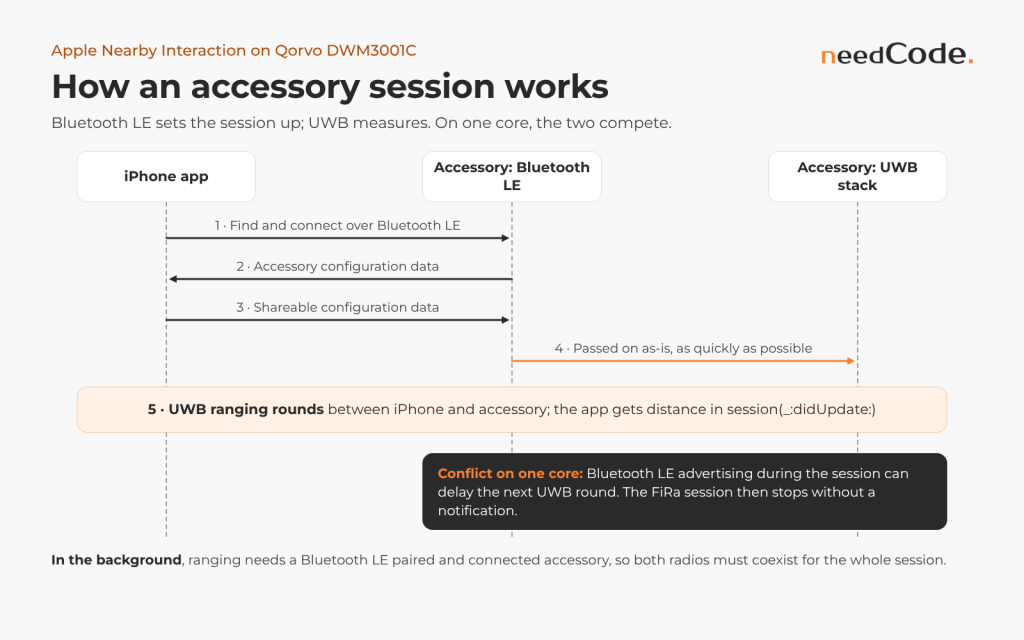
Apple’s public documentation describes five steps:
- The app finds the accessory and opens a data link “using a technology you choose — like CoreBluetooth”.
- The accessory sends its configuration data, and the app creates an
NINearbyAccessoryConfiguration. - iOS generates “shareable configuration data” through
session(_:didGenerateShareableConfigurationData:for:), and the app sends it to the accessory. - The accessory hands that data to its UWB stack. At WWDC21 Apple asked accessory makers to provide it “as-is, and as quickly as possible, to the Ultra-Wideband hardware on board”.
- Ranging updates arrive in the app through
session(_:didUpdate:).
Background use adds a firm Bluetooth LE requirement. From iOS 16, “when the app moves to the background, it can continue ranging only if the peer or accessory is Bluetooth Low Energy (LE)-paired and connected”. At WWDC22 Apple added that in a background session “Ultra Wideband measurements are available on the accessory”, and “you must consume and act on the Ultra Wideband measurements on the accessory”. For the firmware this means Bluetooth LE connection events and UWB rounds must coexist for the whole session. From iOS 18.4 an app can also keep ranging in the background by starting a Live Activity.
Qorvo’s QANI project in the DW3_QM33 SDK implements the accessory side for the DWM3001CDK, the Murata Type 2AB and the nRF52840 DK. Its logs go “over RTT”, so keep the J-Link connected while you debug.
The message protocol in practice
Apple’s sample defines “an example messaging protocol” with a one-byte identifier at the start of each message. QANI uses the same identifiers, and forum developers confirm that 0x0A fetches the configuration and 0x0B starts ranging.
| ID | Sender | Name in Apple’s sample | The accessory should |
|---|---|---|---|
| 0x0A | App | initialize | Reply with 0x01, at any time |
| 0x01 | Accessory | accessoryConfigurationData | Carry the configuration after the ID byte |
| 0x0B | App | configureAndStart | Pass the payload as-is to the UWB stack, start, report 0x02 |
| 0x02 | Accessory | accessoryUwbDidStart | Confirm that ranging runs |
| 0x0C | App | stop | Stop UWB and report 0x03, even when idle |
| 0x03 | Accessory | accessoryUwbDidStop | Also report stops the firmware makes itself |
Three details of the sample matter:
- Writes are not split. It sends at most
maximumWriteValueLength(for: .withResponse)bytes, so a longer message is cut; log byte counts on both sides. - The phone drives recovery. After a
.timeoutremoval it sendsstop, theninitialize; it sendsstopon suspension,initializewhen suspension ends, and opens a newNISessionafter invalidation. - The service UUID must match. It scans for
TransferService(6E400001-B5A3-F393-E0A9-E50E24DCCA9E); Qorvo’s firmware advertisesQorvoNIService(2E938FD0-6A61-11ED-A1EB-0242AC120002).
This dispatcher is illustrative; ble_send() and the uwb_* calls are your own wrappers.
/* Illustrative: accessory side of Apple's example message protocol. */
enum { MSG_ACC_CONFIG = 0x01, MSG_UWB_STARTED = 0x02, MSG_UWB_STOPPED = 0x03,
       MSG_INIT = 0x0A, MSG_CONFIGURE_AND_START = 0x0B, MSG_STOP = 0x0C };

void on_phone_write(uint16_t conn, const uint8_t *p, uint16_t len)
{
    if (len < 1)
        return;
    switch (p[0]) {
    case MSG_INIT:                    /* may arrive at any time */
        uwb_stop_if_running(conn);
        ble_send(conn, MSG_ACC_CONFIG, acc_config, acc_config_len);
        break;
    case MSG_CONFIGURE_AND_START:     /* pass the payload as-is, at once */
        if (uwb_start(conn, p + 1, len - 1) == 0)
            ble_send(conn, MSG_UWB_STARTED, NULL, 0);
        break;
    case MSG_STOP:                    /* must also work when idle */
        uwb_stop_if_running(conn);
        ble_send(conn, MSG_UWB_STOPPED, NULL, 0);
        break;
    }
}
Timing rules that touch the radio schedule
- Deliver the shareable data fast. Apple at WWDC21: “If the ShareableConfigurationData is not sent quickly enough, your session may timeout.” Peripheral latency “allows the peripheral to skip waking up for a certain number of connection events”, so keep it at 0 during setup.
- Restore the same session, or say so. A cached configuration “will only remain valid as long as the session on the accessory was not terminated”. After a MAC restart with the same parameters, one developer reports that the iPhone “does not notice”. If the accessory cannot restore the session, it should send 0x03.
- Background sessions add duties. Per WWDC22, the accessory exposes the Nearby Interaction GATT service with an encrypted Accessory Configuration Data characteristic per parallel session, and the app pairs and starts connection attempts even when the accessory is out of range. Without the link, the session can end with
accessoryPeerDeviceUnavailable.
What the forum reports show
| Thread and date | What happened | Status |
|---|---|---|
| “nRF5340 + DWM3000 for Apple NI”, September 2026 | “BLE advertising during a UWB session makes the FiRa session silently stop scheduling rounds.” Another user: “The board even completely stalls sometimes, so only Watchdog can restore it.” | Qorvo staff answered on the nRF5340; the stall itself is unresolved |
| “QANI project and multiple FiRa sessions”, December 2025 | Two iPhones; distance froze after the second connected | Qorvo staff described how multiple sessions could work; a community answer marked as solution says QANI supports one session at a time |
| “nRF52840DK + DWM3000EVB QANI hangs after shareable configuration data”, June 2026 | Hang right after the iPhone’s configuration arrived | Qorvo staff: “a bug regarding the compatibility of this SDK (1.1.1) and the DWM3000EVB”; unofficial patch provided |
| “DWM3001CDK iPhone 16 demo not working”, May 2026 | Board not found over Bluetooth LE; later, direction only after camera assistance converged | Community answers only |
| “iOS NI ranging stuck, no distance data”, February 2026 | Custom app connected but never started ranging | Solved: the app had to send the configure-and-start message |
| “BLE and UWB coexistence on Murata Type2AB”, August 2026 | sd_softdevice_enable() never returned after adding Bluetooth LE | Solved with the SPIM3 anomaly workaround off and the right SoftDevice conversion script |
| “QANI: upgrading SoftDevice from 7.2.0 to 7.3.0”, December 2025 | Firmware failed after the upgrade | Solved with Qorvo’s SoftDevice conversion script |
| “UWB ranging failure with recovery on reset”, January 2026 | After QANI’s 5 s no-distance check, restarts logged “Fira Report: err 0xFF” until a reset | Qorvo staff could not reproduce it |
Why Bluetooth LE and UWB block each other on one core
Five mechanisms meet on the nRF52833:
- Interrupt priorities. The SoftDevice reserves level 0 for “timing critical processing”, level 1 for memory protection and level 4 for deferrable work, and “the priorities of the interrupts reserved by the SoftDevice cannot be changed”. Application levels 2 and 3 (
APP_IRQ_PRIORITY_HIGHandAPP_IRQ_PRIORITY_MID) see latency only from levels 0 and 1, so UWB handling always runs below the Bluetooth LE radio work. - Bursts of radio events. Nordic’s typical figures are about 257 µs of processor time per three-packet advertising event and 299 µs per peripheral connection event with one packet each way; one level-0 radio interrupt can take up to 250 µs. The advertiser starts “asynchronously to any other role timing-events”, so its events drift across the UWB schedule.
- Flash operations. A page erase through the SoftDevice takes up to 90 ms at level 0, with the CPU “halted most of the length of this interrupt”. The nRF5 SDK Peer Manager stores bonds in Flash Data Storage (FDS), so pairing during a session can block the core.
- Tight UWB timing. The FiRa MAC programs the DW3000 to transmit and receive at exact times. If the host is late, “the transmission is aborted (transceiver off)” and
dwt_starttx()returns -1; the IC counts these half-period warnings in an 8-bit HPW counter. - Memory. S113 7.2.0 takes 112 KB of the chip’s 512 KB of flash and at least 4.4 KB of its 128 KB of RAM. Community members call the nRF52833 on the kit “very memory constrained”, and one could not fit Bluetooth LE into the UCI build.
One developer measured the effect on a QANI accessory with an iPhone as controller. Stock QANI stops advertising once connected, and he never saw the freeze with it. With a four-connection build advertising every 200 ms while connected, he saw one to five freezes per hour; none in 92 minutes with advertising stopped; one in 92 minutes at 1 s; and about six per hour with two iPhones, which froze together. “BLE connection events alone (30 ms connection interval, no advertising) do not cause it.” While frozen, the board showed “DW3000 IRQ pin low, no pending GPIOTE event, nothing pending in NVIC, no MCU timer armed”, and the iPhone kept sending its block every 483 ms. His unconfirmed reading: an advertising event delayed the stack when it had to program the next round, and the MAC never rescheduled. Accepting more iPhones therefore needs exactly the advertising linked to freezes.
Host architecture options
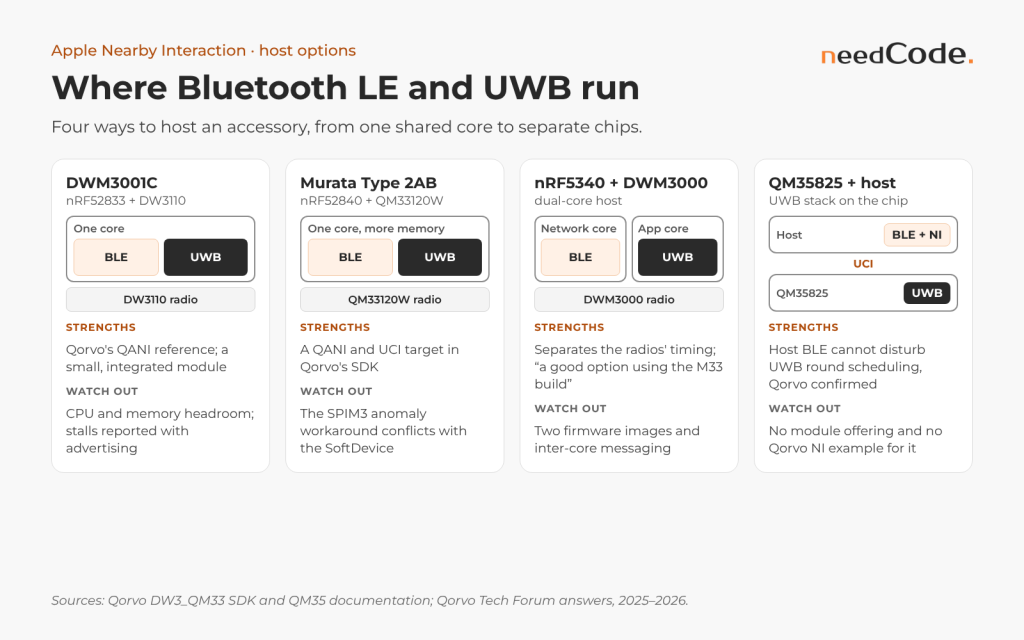
| Host | How Bluetooth LE and UWB share it | Strengths | Watch out for |
|---|---|---|---|
| DWM3001C (nRF52833 + DW3110) | One core: SoftDevice, FreeRTOS and the FiRa library | Qorvo’s QANI reference; small, integrated module | Processor and memory headroom; stalls reported with advertising |
| Murata Type 2AB (nRF52840 + QM33120W) | One core, more memory | QANI and UCI target in the SDK | The SPIM3 anomaly workaround conflicts with the SoftDevice |
| nRF5340 with DWM3000 | Bluetooth LE controller on the network core, UWB on the application core | Separates the radios’ timing; Qorvo staff: “a good option using the M33 build” | Two firmware images and inter-core messaging |
| QM35825 with a host | UWB stack on the QM35825; the host runs Bluetooth LE and Nearby Interaction over UCI | Qorvo confirmed host Bluetooth LE cannot disturb UWB round scheduling | No module offering and no Qorvo Nearby Interaction example for it |
Choosing a host
- DWM3001C and Type 2AB share one core; the Type 2AB adds memory (1 MB of flash, 256 KB of RAM), not timing headroom.
- nRF5340 runs the Bluetooth LE controller on the network core (64 MHz, 256 KB of flash, 64 KB of RAM) and the host, application and UWB on the application core (up to 128 MHz, 1 MB of flash, 512 KB of RAM), with shared memory and IPC between them. QANI is built on the nRF5 SDK 17.1.0, which covers only nRF51 and nRF52 and “is in maintenance mode”, so plan a port to the nRF Connect SDK, plus per-unit antenna calibration for DWM3000 modules.
- QM35825 with a host separates the UWB stack completely; Qorvo staff put the session limit at “mostly a limitation of the available radio time”, but you write the Nearby Interaction side yourself.
If the product must accept new phones while it ranges, choose a host where advertising cannot pre-empt the UWB stack.
Scheduling Bluetooth LE around UWB on one core
Most levers sit on the Bluetooth LE side: Qorvo staff say the accessory can set only a few UWB parameters, “like the device role and update rate”.
- Stop advertising while a UWB session runs (
sd_ble_gap_adv_stop()) and resume it afterwards. To accept more phones, use Apple’s slowest intervals, 1022.5 or 1285 ms, and measure. - Keep connection events short and GATT traffic low. The SoftDevice’s
event_lengthis “the time set aside for this connection on every connection interval”, in 1.25 ms units (default 3, minimum 2). - Give UWB handling the highest application priority available, level 2, and keep its interrupt handlers short. In a 2024 thread, moving UWB response code into higher-priority interrupts resolved late transmissions caused by Bluetooth mesh load.
- Keep flash writes out of sessions: bond before ranging and avoid FDS garbage collection during a session.
- Correlate with Bluetooth LE activity through Nordic’s Radio Notification signals, which mark each radio event with a configurable lead time.
- Count late transmissions with the DW3000’s half-period warning counter.
- Add a MAC-level watchdog that restarts all sessions and the MAC, and log every restart. Restarting only the frozen session did not recover two parallel sessions.
Advertising and connection parameters iOS accepts
Apple’s public Accessory Design Guidelines (Release R31, September 2026) set the values iOS expects:
- Advertising: 20 ms for at least 30 seconds, then 152.5, 211.25, 318.75, 417.5, 546.25, 760, 852.5, 1022.5 or 1285 ms.
- Connection requests: Interval Min of at least 15 ms, a multiple of 15 ms and at most 2 s; Interval Max at least 15 ms higher, or both 15 ms; latency up to 30; supervision timeout of 6 to 18 s and above Interval Max × (latency + 1) × 3; Interval Max × (latency + 1) of 6 s or less.
Requests outside these rules “may be rejected”, and iOS ignores the Peripheral Preferred Connection Parameters characteristic. Defaults often miss the rules: Nordic’s S113 UART example asks for 20–75 ms with a 4 s timeout, and Zephyr’s default preferred timeout is 420 ms. These values are illustrative:
/* Illustrative (nRF5 SDK 17.1.0, S113): Apple ADG R31 advertising pattern
 * and connection parameters inside the ADG rules. Advertising intervals in
 * 0.625 ms units, timeouts in 10 ms units. */
init.config.ble_adv_fast_enabled  = true;
init.config.ble_adv_fast_interval = 32;      /* 20 ms */
init.config.ble_adv_fast_timeout  = 3000;    /* 30 s */
init.config.ble_adv_slow_enabled  = true;
init.config.ble_adv_slow_interval = 1636;    /* 1022.5 ms */
init.config.ble_adv_slow_timeout  = BLE_GAP_ADV_TIMEOUT_GENERAL_UNLIMITED;

#define MIN_CONN_INTERVAL  MSEC_TO_UNITS(30, UNIT_1_25_MS)    /* 24 */
#define MAX_CONN_INTERVAL  MSEC_TO_UNITS(45, UNIT_1_25_MS)    /* 36 */
#define SLAVE_LATENCY      0
#define CONN_SUP_TIMEOUT   MSEC_TO_UNITS(6000, UNIT_10_MS)    /* 600 = 6 s */

/* When a UWB session starts (after 0x0B): */
(void)sd_ble_gap_adv_stop(m_advertising.adv_handle);
On a Zephyr host, such as the nRF5340 application core (illustrative):
# Illustrative prj.conf (Zephyr Bluetooth host, e.g. nRF5340 app core).
# Interval units 1.25 ms: 24 = 30 ms, 36 = 45 ms. Timeout units 10 ms:
# 600 = 6 s. Zephyr v4.2.0 defaults are 24, 40, 0 and 42 (420 ms).
CONFIG_BT_PERIPHERAL=y
CONFIG_BT_GAP_AUTO_UPDATE_CONN_PARAMS=y
CONFIG_BT_PERIPHERAL_PREF_MIN_INT=24
CONFIG_BT_PERIPHERAL_PREF_MAX_INT=36
CONFIG_BT_PERIPHERAL_PREF_LATENCY=0
CONFIG_BT_PERIPHERAL_PREF_TIMEOUT=600
Do not lengthen the connection interval just in case: the only published data saw no freezes from 30 ms connection events, and a longer interval delays the app’s stop and initialize messages.
Measuring stalls: set-up, test length and pass criteria
Define a stall
- Accessory: the ranging count has not changed for 2 s during an active session, about four missed blocks at the iPhone’s 483 ms block.
- iPhone: no
session(_:didUpdate:)for the accessory for 2 s in the foreground, or a.timeoutremoval. - Outage: the developer above loses about 2.5 s per freeze with a 2 s watchdog; the author of thread 25999 lost about 16 s with a 15 s watchdog.
Put four timelines side by side
- iPhone log: every update with a timestamp, and every removal reason.
- RTT log: in a log posted on the forum, older QNI firmware prints one line per block with a “Block” number, which makes gaps easy to find.
- Logic analyser: a Radio Notification pin, the DW3000 interrupt line and a watchdog pin. In S113 7.2.0, flash writes and erases also appear as radio events, so long pulses reveal flash activity.
- Sniffer: UWB frames and the Bluetooth LE exchange on one timeline.
The sketches below are illustrative. app_ranging_count() wraps the counter developers report reading with fira_helper_get_ranging_count(), and app_uwb_restart_all() wraps the full stop and restart (uwbmac_stop(), fira_helper_close() and so on).
/* Illustrative (nRF5 SDK 17.1.0): Bluetooth LE radio activity on a pin. */
#define PIN_BLE_ACTIVE  NRF_GPIO_PIN_MAP(0, 2)    /* any free pin */

static void on_radio(bool radio_active)
{
    nrf_gpio_pin_write(PIN_BLE_ACTIVE, radio_active);
}

void ble_probe_init(void)
{
    nrf_gpio_cfg_output(PIN_BLE_ACTIVE);
    APP_ERROR_CHECK(ble_radio_notification_init(APP_IRQ_PRIORITY_LOW,
                        NRF_RADIO_NOTIFICATION_DISTANCE_800US, on_radio));
}

/* Illustrative stall watchdog, called every 500 ms. Enable the counters
 * once at start-up with dwt_configeventcounters(1). */
#define STALL_MS 2000u
static uint32_t last_count, last_change_ms;
static uint8_t  last_hpw;

void uwb_watchdog_poll(uint32_t now_ms)
{
    uint32_t count = app_ranging_count();

    if (count != last_count || !app_uwb_session_active()) {
        last_count = count;
        last_change_ms = now_ms;
        return;
    }
    if (now_ms - last_change_ms < STALL_MS)
        return;

    dwt_deviceentcnts_t c;
    dwt_readeventcounters(&c);                 /* MAC is silent here */
    uint8_t hpw = (uint8_t)(c.HPW - last_hpw); /* 8-bit counter wraps */
    last_hpw = c.HPW;
    LOG_STALL(now_ms, count, hpw, c.TXF, c.RTO);
    app_uwb_restart_all();
    last_change_ms = now_ms;
}
// Illustrative (iOS): log every update so gaps can be found offline.
var lastUpdate = [NIDiscoveryToken: TimeInterval]()
func session(_ session: NISession, didUpdate nearbyObjects: [NINearbyObject]) {
let now = NSDate().timeIntervalSinceReferenceDate
for object in nearbyObjects {
let gap = now - (lastUpdate[object.discoveryToken] ?? now)
lastUpdate[object.discoveryToken] = now
logger.info("NI t=\(now) gap=\(gap) d=\(object.distance ?? -1)")
}
}
func session(_ session: NISession, didRemove nearbyObjects: [NINearbyObject],
reason: NINearbyObject.RemovalReason) {
logger.error("NI removed reason=\(reason.rawValue)")
}Read the DW3000 counters only while the MAC is silent, because the FiRa library owns the SPI bus during sessions; HPW increments before a stall point to host latency.
Decide how long to run
Use NIST’s exponential, constant-rate test tables. With zero stalls, the 95% lower bound on the mean time between stalls is the total test time divided by 3.00; with one stall allowed, the factor is 4.74. A clean 92-minute run therefore proves only about 31 minutes, less than the hour that the 200 ms build sometimes managed. Showing more than 10 hours needs 30 stall-free board-hours, and NIST notes that hours add up across units: five boards for six hours count as 30. First check that the intervals between stalls show no periodic structure; the author of thread 25999 looked for a 512 s period, the wrap time of a 24-bit counter at 32,768 Hz.
A configuration passes when it reaches those board-hours without a stall on every phone model, with distance, orientation and phones kept fixed.
Direction: why some iPhones show distance only
The DWM3001C has a single UWB antenna, so the accessory cannot measure angle of arrival. A Qorvo team member put it plainly on the forum in 2025: the DWM3001CDK “has a single antenna and that alone will not provide you with AoA information”. Direction comes from the iPhone, and what it can do depends on the model.
- Apple’s documentation says that on iPhone, direction to third-party accessories is available in sessions that enable camera assistance (
isCameraAssistanceEnabled, iOS 16 and later, off by default). - Qorvo staff wrote in February 2025: “Direction and elevation are not available on iPhone 14 or newer, instead they rely on camera assistance to estimate the AoA”.
- Qorvo’s own iOS app notes that “on iPhone 14, 15 & 16 the elevation will indicate SAME / ABOVE / BELOW instead of the azimuth angle”.
- Camera assistance gives direction outside the narrow field of view “only after first encountering the peer device once within the narrow line of sight”, which is why users wave the phone around until the arrow appears.
Apple’s own advice applies to every product: “Not all devices will support direction measurements nor camera assistance, so be sure to include experiences that are tailored to the capabilities of this device.”
Symptom, cause, test
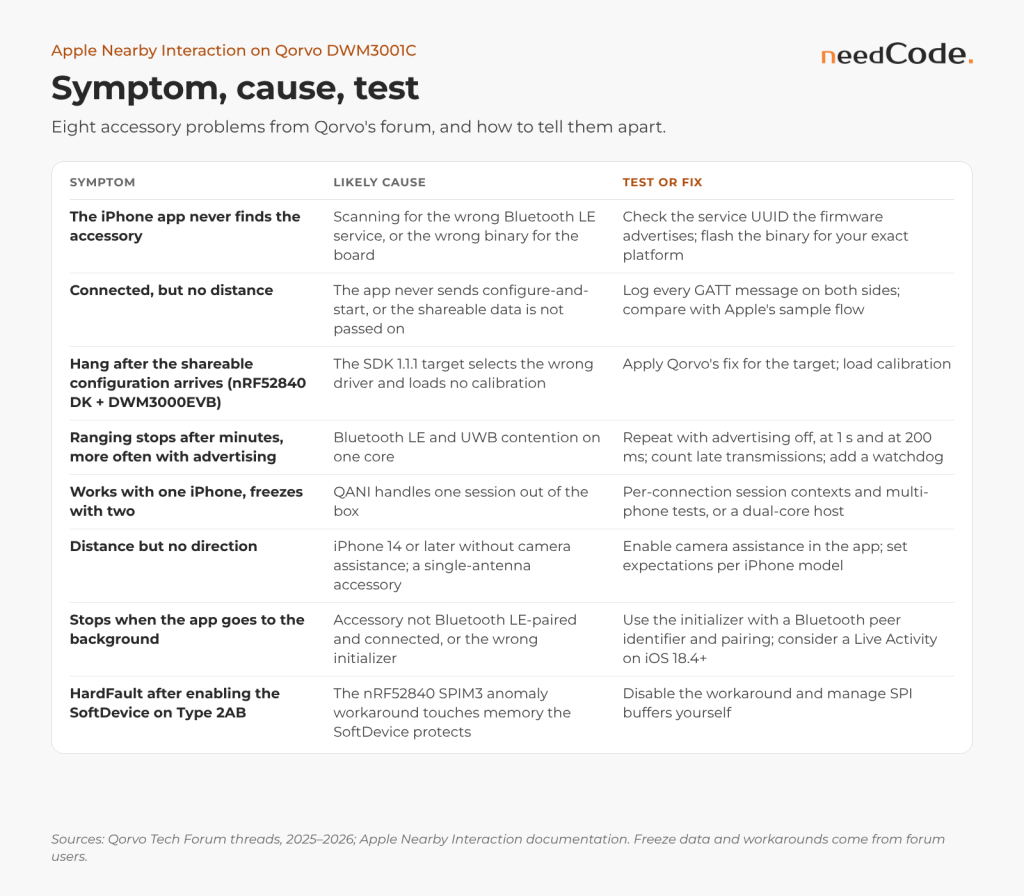
| Symptom | Likely cause | Test or fix |
|---|---|---|
| The iPhone app never finds the accessory | Scanning for the wrong Bluetooth LE service, or the wrong binary for the board | Check the service UUID the firmware advertises; flash the binary for your exact platform |
No advertising; RTT shows fds_init() returned 0x860A | FDS found no erased pages; it “will not erase any unknown pages by itself” | Erase the chip, then flash; keep the image clear of the FDS pages |
| Writes fail with “Encryption is insufficient” | Pairing not accepted on the iPhone | Accept the pairing prompt |
| Link drops about 90 s after connecting | Connection parameters that do not suit the iPhone | Time connect to disconnect; use Apple’s rules |
| Connected, but no distance | The app never sends the configure-and-start message, or the shareable data is not passed on | Log every GATT message on both sides and compare with Apple’s sample flow |
| Hang after the shareable configuration arrives (nRF52840 DK + DWM3000EVB) | SDK 1.1.1 target selects the wrong driver and loads no calibration | Apply Qorvo’s fix for the target; load calibration |
| Ranging stops after minutes, more often with advertising | Bluetooth LE and UWB contention on one core | Repeat with advertising off, at 1 s and at 200 ms; count late transmissions; add a watchdog |
| Stall right after pairing or bonding | Flash erase or write, up to 90 ms per page erase | Look for long pulses on the radio-notification pin; bond before ranging |
| Works with one iPhone, freezes with two | QANI handles one session out of the box | Design per-connection session contexts, test multi-phone flows, or move to a dual-core host |
| Distance but no direction | iPhone 14 or later without camera assistance; single-antenna accessory | Enable camera assistance in the app; set expectations per iPhone model |
| Stops when the app goes to the background | Accessory not Bluetooth LE-paired and connected, or wrong initializer | Use init(accessoryData:bluetoothPeerIdentifier:) with pairing; consider a Live Activity on iOS 18.4 and later |
| HardFault after enabling the SoftDevice on Type 2AB | The nRF52840 SPIM3 anomaly-198 workaround touches memory the SoftDevice protects | Disable the workaround and manage SPI buffers yourself |
A test matrix for accessories
- iPhones: first-generation UWB (iPhone 11 to 14) and second-generation UWB (iPhone 15 and later; Apple’s list leaves out the iPhone 16e and 17e), on the current and previous iOS versions.
- Flows: first pairing, background, return to foreground, phone reboot, accessory reboot, out of range and back, two or more phones.
- Radio settings: advertising and connection intervals as configured in the product, plus long runs sized with the statistics above.
- Evidence: a UWB sniffer with a Bluetooth LE companion captures the setup exchange and the UWB session on one timeline, and RTT logs show what the accessory firmware did.
- Test client: Apple’s sample app stops rescanning after five connections (
defaultIterations = 5); change that before long runs.
Testing every flow by hand on every phone does not scale. Automating the phone side, or simulating it for regression runs, keeps the matrix affordable.
From our engineering work
Our Modular UWB Sniffer has Bluetooth LE and CAN companions that capture the out-of-band session setup next to the UWB frames. For an automotive OEM (anonymised), we cut Bluetooth LE connection handover failures at maximum load from 71% to 8%, with the root cause proven two ways. Our engineers work daily with Nordic nRF5x hosts and Qorvo’s DW and QM series.
How needCode helps
We build and stabilise Nearby Interaction accessories on Qorvo silicon: QANI-based firmware on the DWM3001C, Murata Type 2AB or nRF5340, multi-phone session handling, Bluetooth LE scheduling around UWB, and the iOS companion app. We reproduce stalls on a bench with sniffer captures and long runs, fix them or escalate them with evidence, and set up the iPhone test matrix for every release.
Frequently asked questions
Why does my DWM3001CDK stop ranging with an iPhone?
Forum reports point to Bluetooth LE advertising during UWB sessions, several iPhones at once, firmware built for the wrong target and gaps in the app’s message flow. Qorvo has published no root cause for the silent stalls. Locate the layer with logs, a half-period warning count and a sniffer capture, then change one variable at a time.
How do I run Bluetooth LE and UWB together on nRF52833 or nRF5340?
On the single-core nRF52833, keep advertising off or slow during UWB sessions, keep GATT traffic low, give UWB the highest application priority and add a MAC-level watchdog. On the nRF5340, the Bluetooth LE controller runs on the network core, and Qorvo staff call it “a good option using the M33 build” of the UWB stack.
Why does my iPhone show distance but no direction?
The DWM3001C has one antenna, so direction must come from the iPhone. Qorvo staff state that on iPhone 14 and newer, direction and elevation rely on camera assistance, which the app must enable and which needs the accessory to appear once in the camera’s field of view.
Can a DWM3001C accessory range with several iPhones at once?
iOS opens one unicast session per accessory, and Qorvo staff say there is no restriction to do the same on the accessory side with per-connection contexts. Out of the box, QANI handles one session at a time, and keeping advertising on for more phones increases the risk of stalls. Treat multi-phone support as a design task with its own tests.
Does a Nearby Interaction accessory need Bluetooth LE?
For background sessions, yes: the accessory must be Bluetooth LE-paired and connected. A Qorvo engineer noted in 2024 that “regular NI sessions don’t require BLE to be connected” and that the setup data can travel over another link, such as Wi-Fi. Most accessories use Bluetooth LE for both.
Do I need Apple’s MFi programme to build an accessory?
Apple publishes the accessory protocol specification to developers under its program terms and refers to “Made for iPhone (MFI)-certified third-party chipsets”. In 2024 a Qorvo engineer pointed developers to Apple’s MFi programme for the session details. Requirements depend on the product and the features you use, so confirm them with Apple and your chipset vendor early.
Which advertising and connection intervals should an accessory use?
Follow Apple’s Accessory Design Guidelines: 20 ms advertising for at least 30 seconds, then a longer listed interval of up to 1285 ms; an Interval Min that is a multiple of 15 ms, latency up to 30 and a supervision timeout of 6 to 18 s. On a DWM3001C, stop advertising while ranging.
How long must a stall test run before I trust a fix?
With zero stalls, divide the total stall-free time by NIST’s 95% factor of 3.00 to get the lower bound on the mean time between stalls. Claiming more than 10 hours needs 30 board-hours, such as five boards for six hours; a clean 92-minute run proves only about 31 minutes.
Why does my own iOS app connect but never receive distance?
Check the message flow: send 0x0A, build NINearbyAccessoryConfiguration(data:) from the 0x01 reply, run the session and send the shareable data in a 0x0B message. Then check the service UUID, the pairing prompt and byte counts.
Sources
- Apple: Nearby Interaction framework and NINearbyAccessoryConfiguration
- Apple: isCameraAssistanceEnabled and Initiating and maintaining a session
- Apple WWDC21: Explore Nearby Interaction with third-party accessories and WWDC22: What’s new in Nearby Interaction
- Apple: Implementing spatial interactions with third-party accessories (sample code)
- Apple Support: Ultra Wideband availability (March 2026) and Extending advanced direction finding and ranging
- Qorvo Tech Forum: nRF5340 + DWM3000 for Apple NI (September 2026) and QM35825 and Apple Nearby Interaction (September 2026)
- Qorvo Tech Forum: QANI and multiple FiRa sessions (December 2025) and FiRa controller session stops silently (2026)
- Qorvo Tech Forum: nRF52840DK + DWM3000EVB QANI hang (June 2026) and iPhone 16 demo not working (May 2026)
- Qorvo Tech Forum: NI ranging stuck (February 2026) and accessory not detected by Apple’s sample app (2024)
- Qorvo Tech Forum: BLE and UWB coexistence on Murata Type2AB (August 2026) and SoftDevice upgrade in QANI (December 2025)
- Qorvo Tech Forum: direction and elevation on newer iPhones (staff, February 2025) and Qorvo Nearby Interaction app (App Store)
- Qorvo Tech Forum: ranging without a Bluetooth connection (staff, 2024) and Nearby Interaction session details and Apple’s MFi programme (staff, 2024)
- Nordic S140 SoftDevice Specification: interrupt priority levels, advertiser processor usage and S113 Radio Notification
- Nordic DevZone: anomaly 198 workaround and the SoftDevice and Murata: UWB modules with Qorvo
- Qorvo: solutions interoperable with Apple U1 (June 2021)
- Apple: NISessionDelegate and NIError.Code
- Apple: Accessory Design Guidelines for Apple Devices, Release R31 (September 2026)
- Nordic S140 SoftDevice Specification: peripheral connection processor usage and Flash API processor usage
- Nordic S140 SoftDevice Specification: advertiser timing
- Nordic: nRF5 SDK 17.1.0, with SoftDevice S113 7.2.0 headers and release notes and nRF5 SDK product page
- Nordic: nRF52833, nRF52840 and nRF5340 product pages
- Nordic: Working with nRF5340 DK (nRF Connect SDK 2.1.2)
- Nordic Developer Academy: Connection parameters and Zephyr v4.2.0: Bluetooth host Kconfig
- Qorvo: DW3xxx/QM33xxx Device Driver API Guide (forum attachment, April 2025)
- NIST/SEMATECH e-Handbook of Statistical Methods: exponential life distribution tests
- Qorvo Tech Forum: UWB ranging failure with recovery on reset (January 2026) and disconnects after 90 seconds in an early QNI release (staff, 2023)
- Qorvo Tech Forum: “Encryption is insufficient” on the NI service (March 2026) and wrong binary and fds_init() error (2025 and 2026)
- Nordic DevZone: fds_init() returned 0x860A on nRF52833
- Qorvo Tech Forum: DW3000 transmission aborted under Bluetooth mesh load (December 2024) and Bluetooth LE added to the UCI example (2025 and 2026)
- Qorvo Tech Forum: single antenna and AoA (February 2025) and QANI logs over RTT (staff, January 2026)
- Qorvo Tech Forum: UCI over BLE and QANI targets (staff, December 2025) and parameters the accessory can set (staff, June 2025)
About needCode
needCode is an independent embedded engineering company from Kraków, Poland, and an official UWB business partner of Qorvo. Its engineers have worked inside Qorvo’s wireless programmes for more than eight years, including on the public QM35 SDK. needCode is certified to ISO 9001:2015 and ISO/IEC 27001:2022 and is a member of the UWB Alliance. This article does not represent Qorvo. All trademarks belong to their respective owners.